The complete catalog
Everything MMAP can do.
Nobody chooses a school platform by counting features, so this page is not a scorecard. It is here for the moment when you are fairly sure what you need and want to know whether it exists, which usually means you are holding one of five questions.
- Is your staff growing?
- Are your outcomes equitable?
- Is your board making decisions from real data?
- Are you retaining your guides?
- Is your adolescent program actually Montessori?
Search for the thing you came to find, or scan by area and see what unlocks at each tier. If the answer to your question is not here, that is worth knowing early, and we would rather you found out on this page than four months into an implementation.
Support and wellbeing, as it looks
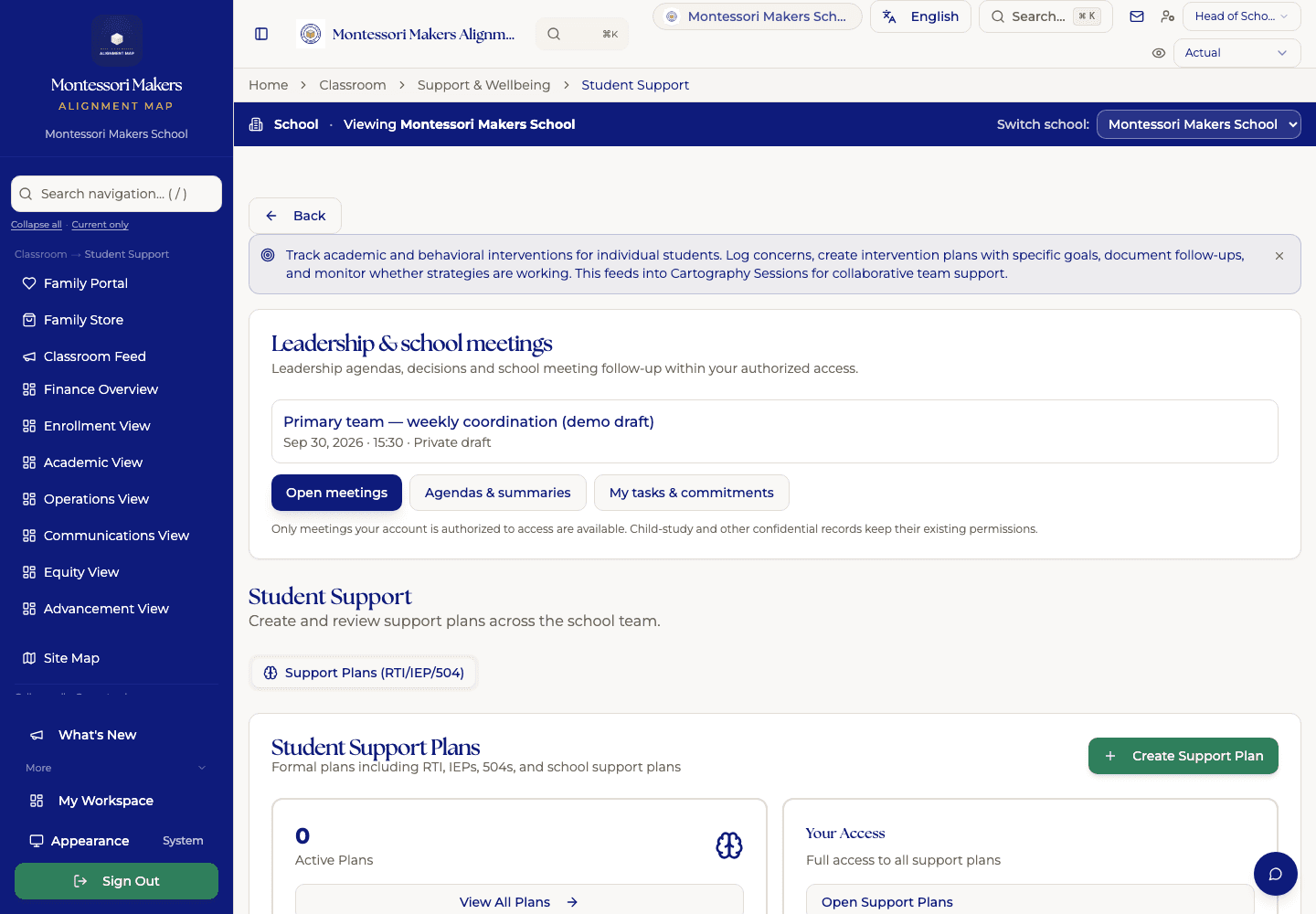
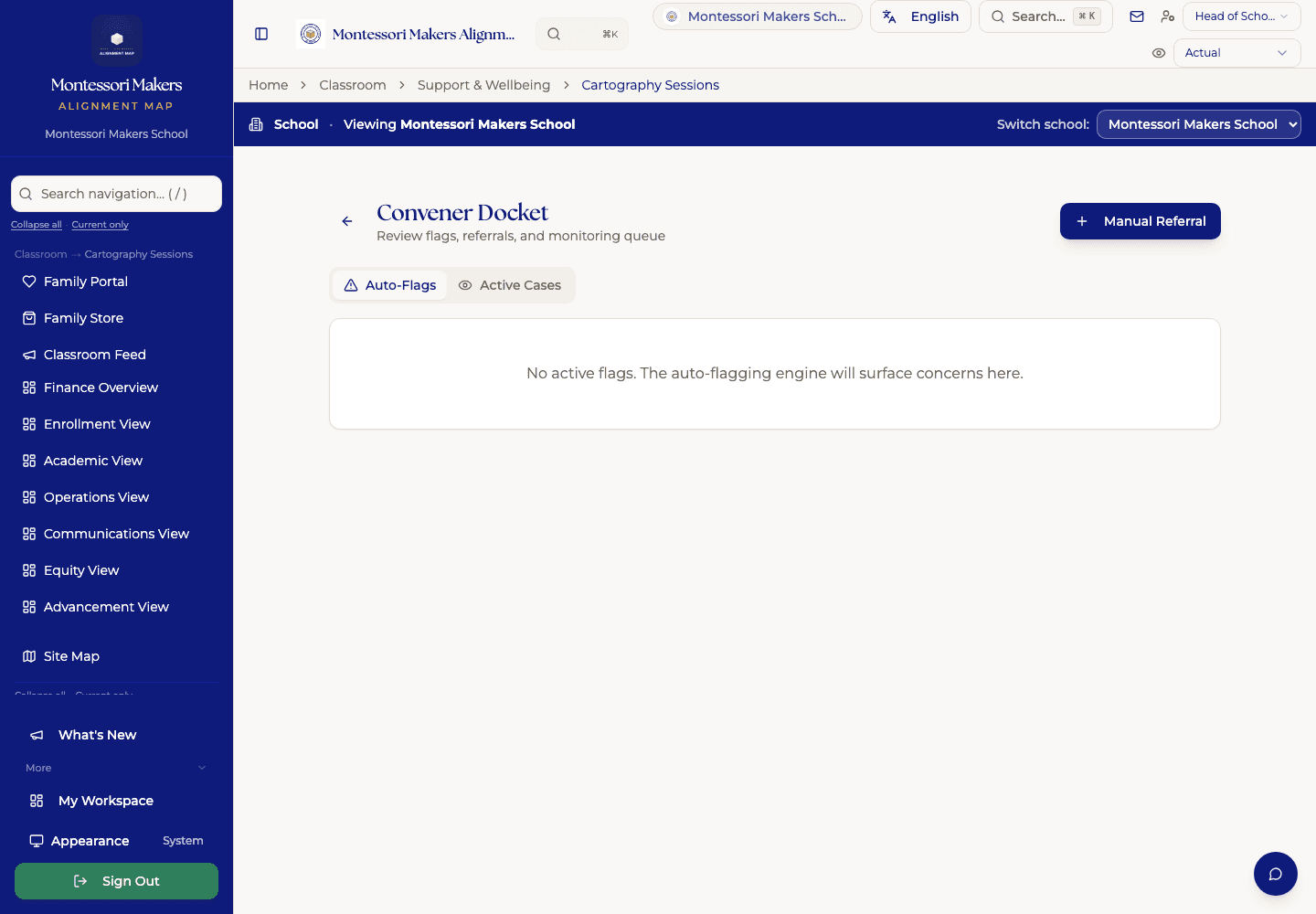
Montessori Makers School, our demonstration school. Every child and figure in it is invented.
Profiles & Classes
- Student Information System
Central student records with demographics, enrollment, guardians, and history. Every other classroom feature pulls from here.
- Grade Level
The conventional grade a state filing or testing registration asks for, alongside the Montessori level. Set it on the student and your value is the one everyone sees; leave it blank and MMAP works it out from their birthday at your own enrollment cutoff and marks it as an estimate, so a child who turns 7 in November reads as 1st grade, not 2nd. Shows on the student profile, the roster, and Class Builder for the year being built.
- Conference Scheduler
Open a booking window per classroom and families pick their own conference time in the portal: atomic booking (no double-booking, one slot per child), reschedule/cancel, add-to-calendar, staff view of who hasn't booked, block/book-on-behalf, and a one-click jump from a booked slot into the conference session to document it.
- Report Sharing & Family PDFs
Progress reports and conference summaries are drafts until a guide explicitly shares them. Sharing notifies every guardian in the portal; families read the full report online and download or print it as a PDF. Guides can edit and re-share: families never see mid-edit drafts.
- Voluntary Demographics (Equity)
A school-level switch that asks for optional self-identification everywhere it matters: demographic questions on the application form (see your admissions funnel, not just your enrolled community), a family self-ID card in the portal, and a staff self-ID card for adult-equity data. Every question optional, aggregate-only, and removable by the person any time.
- Roster Data Health
A per-field completeness view of your roster: emergency contacts, allergies, immunizations, guardians linked, classroom placement, race/ethnicity, photos. Each one explains why it matters. One click sends families a pre-filled profile-completion form; their answers save straight to the student record.
- Classroom Management
Manage rosters, assignments, capacity, and which guides are paired with which classroom, using staff roles your school defines (lead, associate guide, support, enrichment, whatever fits your context), not a fixed list.
- Class Builder
Visual tool for building next-year placements. Shows age mix, gender balance, and continuity in one screen as you assign each child. Pulls in current-roster and incoming-pipeline students so next year's rooms are built from the real list, not a spreadsheet copy.
Guide Tools
- Staff Dashboard
The guide's daily landing page. Today's roster, lessons due, follow-ups, messages, and the kids who need a closer look this week.
- Classroom View
Your classroom on one screen. Roster, today's plan, observations needing follow-up, kids you haven't checked in with this week.
- Lesson Tracking
Quick-log presentations as they happen. Each lesson links to the curriculum so progress reports build themselves. Log a child's repetitions too: the independent practice that signals real acquisition, tracked separately from the guide's presentations.
- Weekly Plan
A Monday-through-Friday calendar grid for planning the week ahead. Add curriculum items to each day, tag specific students or whole-class, and check lessons off as the week unfolds, checking one off records it straight to each child's lesson history, with children who were absent that day automatically left out. A familiar layout guides learn in minutes, just smarter underneath.
- Progress Grid
Your whole classroom against any curriculum strand: one row per child, one column per lesson, color-coded by progress. Tap a cell to record a presentation on the spot: each tap steps the child up the ladder from Observed to Mastery, and the record saves itself with you as presenter. Progress never moves backwards, so a stray tap can't erase mastery.
- Lesson Planner Suggestions
Embedded next-presentation suggestions per child, drawn from observation history, lesson logs, and developmental readiness. Sits alongside the Weekly Plan so guides can plan from the calendar OR from the child's pace, whichever fits how their team works.
- Observations
Capture what you notice in two taps. Observations attach to the right student and surface in conferences automatically.
- Quick Observation Capture
A floating capture button on every page so you can log a moment without breaking flow.
- Substitute Plans
One-click sub plan that pulls today's schedule, classroom norms, and emergency contacts. The sub walks in prepared.
- Conference Prep Packet
Assembles each student's progress, observations, and goals into a parent-conference packet on demand.
- Transition Library
Reusable transition routines, songs, and movement breaks. Save what works and share across classrooms.
- Child Arc (multi-year)
See a student's full developmental arc across years. Coaches and lead guides use this for long-view planning.
Academics
- Curriculum Browser
Browse the full Montessori scope and sequence. Filter by area, age, and material.
- Curriculum Map
Printable scope-and-sequence one-pager per year, Primary 1 to 3 and Elementary 1 to 6, laid out as a month-by-month grid across every subject area. Click any cell to see the lessons for that month, and any lesson to open it with its aligned standards, the view public-program evaluators ask for. Built from 1,500+ canonical Montessori lessons; survives CCSS-alignment requests without exposing the standards in the parent-facing view.
- Curriculum Management
Create, edit, and organize your school's albums and lesson plans. Import from CSV or PDF.
- Standards Crosswalk
Map Montessori curriculum to state and national standards: Common Core and state frameworks like the NC Standard Course of Study, extensible per state. One lesson can map to many standards, and the same material maps to different standards by grade, so a lesson used in grade 1 and grade 4 aligns correctly in both. When a guide records a lesson, the standards for that child's grade attach automatically, with a picker to narrow. Schools can import their own alignment spreadsheet; unmatched rows are reported, never guessed.
- Progress ReportsMapmaker
Compile a term into a branded, printable whole-child report. Guides write the narrative; MMAP composes the developmental scale from lesson tracking and handles the formatting.
- Specials in Progress Reports
Schools that teach Spanish, music, art, PE, or other classes outside the core Montessori curriculum can attach a per-special narrative to a child's progress report. School-level default list autocompletes the names so teachers don't retype.
- Report Templates
Design and manage progress report templates so every guide writes from a shared structure.
- Portfolios
Student work samples, photos, and milestones organized into a longitudinal portfolio.
- Classroom Development Map
Visual map of where each child is across developmental areas. Spot patterns at the classroom and student level.
- Classroom Newsletters
Build and send classroom newsletters to families, with photos and lesson highlights pulled from the week's records.
- Field Trips
Plan field trips with permission slips, attendance, allergies, and emergency contacts in one place. Trips with a cost invoice each family automatically the moment their slip is signed, and a beginning-of-year template covers routine walking outings so only real trips need real slips.
Support & Wellbeing
- Student Support PlansMapmaker
Track interventions, accommodations, and IEP/504 plans alongside the rest of the student record.
- Intervention TrackingMapmaker
The working half of a support plan: log each intervention session, record how the child responded, and watch the trend over time. Shared across everyone supporting that child: a behavior coordinator, the guide, and an administrator see the same history instead of three separate notebooks.
- Student Risk AnalysisMapmaker
Surfaces students whose attendance, behavior, or progress signals need attention before things escalate.
- Cartography SessionsMapmaker
Deep-dive developmental mapping for individual students. Designed for cross-discipline staff teams to think a child through together.
- Student Pulse SurveysMapmaker
Lightweight student voice surveys to gauge classroom climate, belonging, and how the year is landing.
Assessment & Growth
- Assessment InsightsMapmaker
Analyze assessment data for equity gaps and growth trends across classrooms, demographics, and time: including results pulled in automatically from Montessori Makers Assessment (MMAS).
- Assessment UploadsMapmaker
Bulk-upload standardized results and link them to student records.
- Shared Growth FeedMapmaker
School-wide feed of student growth moments and celebrations. Where a quiet win in one classroom becomes a story the whole school sees.
- Coach Growth Console
Admin view of coaching feedback and growth data across staff.
Academic Leadership
- Level Meeting PlannerMapmaker
Plan and document level-team meeting agendas, action items, and follow-ups.
- CoachingMapmaker
Schedule coaching sessions and document observations, feedback, and goals with staff. Tracks growth over time.
- Materials Inventory
Track Montessori materials and classroom supplies at the album, classroom, and school level.
- Appraisal DashboardMapmaker
Dashboard of all staff appraisals and evaluation cycles in one place.
- Send & Manage AppraisalsMapmaker
Send, track, and manage individual staff appraisals through completion.
Third Plane (Adolescent)
- Adolescent HubMapmaker
Central workspace for adolescent (12 to 18) program management.
- Programs & TimelineMapmaker
View and manage adolescent program timelines, themes, and seminar arcs.
- Student CouncilMapmaker
Student council management: agendas, minutes, decisions, and follow-through.
- Seminar SessionsMapmaker
Plan and track Socratic seminars and discussion sessions.
- Portrait of a GraduateMapmaker
Track skills and competencies against the adolescent program's portrait of a graduate.
- Occupations & ProjectsMapmaker
Manage student occupations, internships, and place-based projects.
- Trips & Place-Based LearningMapmaker
Plan trips and place-based learning experiences with logistics, safety, and community contacts.
- Microeconomy LedgerMapmaker
A tiny in-school economy where adolescents run businesses, set prices, and reconcile a real ledger.
Calendar
- Calendar & Events
School-wide calendar with events, holidays, conference days, and important dates. Families see the same calendar through the family portal. Per-classroom filter narrows the view to a single classroom plus school-wide. Field trips appear on the shared calendar automatically, and an upcoming-events agenda list shows everything at once, no clicking date by date. Public subscribable iCal feed (with one-tap Apple, Google, and Outlook sync) lets parents add the school calendar to their phone once and have it stay current, share with grandparents and babysitters too.
- Google Calendar Import
Moving from a Google Calendar? Upload the .ics once and your existing events land on the MMAP calendar in one shot.
Scheduling
- Term & Day Setup
Set up academic terms, day types, and schedule templates the rest of the school runs against. Terms can carry different dates per program level, and the timetable displays them.
- Per-Level Start Dates
Year-round or staggered calendar? Give Toddler a different start date than Elementary, and MMAP's observation and roster tools anchor to each level's real first day: no false flags the week one program opens before another.
- Timetable by Class
Build and review class-level daily and weekly timetables, or zoom out to the full-school grid: every classroom, every block, one screen, ordered by Montessori level.
- Timetable by Teacher
View teacher schedules and assignment coverage across the whole school.
Attendance & Programs
- Daily Attendance
Take and review daily classroom attendance. Works on phone, tablet, or kiosk. Knows 'no school' days from your calendar and terms, so closures never read as absences.
- Attendance Monitoring
Monitor attendance patterns, trends, and chronic absence at the school and classroom level.
- SIS Exports
Export attendance and enrollment data in the formats your state and district require.
- Programs & Extended Care
Manage extended day programs, summer camps, clubs, and after-school activities: fully editable after creation, with rosters synced into Class Builder.
Facilities
- Prepared Environment
Building and grounds tracking. Facility maintenance, vendor work orders, and inspections.
- Consumables Tracking
School-wide consumables catalog with per-classroom bins. Guides log what's running low without leaving the classroom.
Infant & Toddler
- Day Board
One row per child showing where they are in the day, fed forty minutes ago, changed at 1:10, asleep since 12:40, with taps that log as you go. The question a guide is actually asked at pickup, answered without scrolling a feed.
- Nursing & Bottle Log
Record a nursing session with side and minutes, or a bottle with ounces. A breastfed baby's day is not a list of bottle sizes, and the log says so.
- Diapering, Toileting & Naps
Wet, soiled, dry-check, down, woke: each timestamped against the child and the adult who logged it. The record licensing asks for, kept without a clipboard.
- Medication Administration Record
A dose is recorded against the child's medication with the amount actually given, the adult who gave it, and an optional witness. If a medication requires written permission and no signed guardian authorization is on file, the form says so before you can record it. The MAR a state inspector expects, not a free-text note.
- Family Daily Report
The day's feeding, changes, naps, and notes assembled into the end-of-day report families get. Sent when the day is done: MMAP has no live parent feed, by design.
Before & After Care
- Care Hub
Central dashboard for before- and after-care operations.
- Care Sign In/Out
Sign students in and out of extended care sessions, timestamped, with voice-assisted name entry.
- Care Kiosk
Kiosk mode for parent self-service sign-in and sign-out at pickup.
- Drop-off & Pick-up Kiosk
Tablet at the front door for parents to sign their child in and out of the regular school day. Each tap captures who signed, what time, and direction. Staff see a live who's-here board for every classroom.
- Care Attendance
View extended care attendance records and history.
- Programs & Rosters
Manage extended care programs, rosters, and per-program schedules.
- Fee Rules
Configure extended care fee rules and billing rates.
- Incidental Charges
View and manage incidental charges for extended care, late pickup, and one-off fees.
Pipeline
- Enrollment Season HubMapmaker
Enrollment season at a glance: pipeline metrics, capacity, and what needs your attention this week.
- Admissions Settings
Configure application forms, fees, and enrollment policies.
- Inquiries
Manage prospective family inquiries and initial outreach. Each lead has a record from first contact to enrollment.
- Tours
Schedule and track campus tours. Tour notes and follow-ups attach to the family record.
- Public Program Registration
Open summer programs, community classes, or after-school enrichments to families whose children aren't year-round students. Schools toggle which programs accept public registration; community families submit child + guardian + emergency info from a public page at /s/your-slug/programs. Submissions land in admissions for review and one-click conversion to enrolled students.
- Applications
Review and process student applications with structured status flow.
- Application Fees
Collect application fees via Stripe Checkout at submission. Fee status (pending, paid, waived) shown on the admin pipeline; admins can waive with a reason. Sibling submissions charge one fee per submission, not per child.
- Enrollments
Manage accepted students and enrollment confirmations.
- Incoming Children
Accepted a toddler who starts in fourteen months? They live in a holding area with an intended start date: deposit paid, seat saved, off every roster and attendance sheet until 'Start now' makes them real. Built for schools that enroll well before day one.
- Required Emergency Contacts
Set how many out-of-household emergency contacts every child must have on file: each with a name, phone, and address. Students below the requirement are flagged on their profile, and the whole list exports to CSV for licensing.
- Do-Not-Release List
Record the adults who must NOT collect a child, with the custody order or agreement on file noted beside each name. It shows as a red banner at the top of the student's profile, so staff see it before a handoff: and it is staff-only: families never see this list, even when the person named is one of the child's own guardians.
- Enrollment AgreementsMapmaker
Generate and track enrollment agreement signatures. E-sign included.
- Enrollment Tools
Tools for waitlist management and enrollment decisions.
- Re-Enrollment
Manage the annual re-enrollment process for current families.
- Student Exit Workflow
Withdrawals, transfers, and graduations as a real workflow. Choose immediate vs. end-of-year timing (the student stays on the active roster and billing through the EOY date), capture reason and notes, route through approval if your school requires it, then apply automatically when the effective date arrives. Enrollment history captured for every exit; parent notification and exit survey fire in the same step.
- Tags
Free-form labels on applications, households, students, and faculty. Filter and segment by any tag your school invents, scholarship-track, legacy-family, prospective-fall-26, without anyone defining a taxonomy first.
- SegmentsMapmaker
Save filter sets over applications, households, students, or faculty as named segments. Live preview count as you build the rules; reuse segments as gates on automations.
- Household Profile
A dedicated, linkable page per family that consolidates identity, students, tags, signed forms, billing, lifecycle workflow, and communications in one URL. The Mailchimp audience-detail view, applied to admissions.
- Activity Log
Audit trail of every admissions action and status change.
Family Portal
- Family Portal
Parents see their child's progress, the school calendar, communications, conference scheduling, and sign forms without anyone on staff intermediating.
- 17-Language Auto-Translation
Every label, button, form, table, and message on the family portal translates instantly when a parent picks their language. English, Spanish, French, Arabic, Chinese, Portuguese, Vietnamese, Haitian Creole, Korean, Russian, Hebrew, Farsi, Hindi, Tagalog, Polish, Japanese, and German. Right-to-left scripts render correctly.
- Branded Portal
The family portal renders in the school's brand kit, logo, primary color, heading and body fonts, pulled from the same source as the public apply pages. Parents see the school's identity, not MMAP's.
- Shared Family Drafts
One parent starts the enrollment packet at lunch; the other finishes it after bedtime. Forms autosave as they're filled, either guardian picks up where the other left off, and the draft clears the moment someone signs.
- Enrollment Choices
Families pick their own tuition plan (annual, 2-pay, 10-pay, 12-pay) and care options from their portal: with the rules built in, so an add-on that requires a base service can't be selected without it. Every selection lands in an admin review queue; nothing bills until the school approves.
- What to Bring
Per-level supply and uniform lists: because a toddler's list is not a Junior High list. The school builds it once in settings; each family sees only the items for their own child's level, right in the portal.
- Classroom Parent Directory
The Brightwheel feature families actually miss: parents reaching each other directly for playdates, carpools, and birthday invitations instead of the office relaying messages. Off until your school turns it on, and opt-in for every parent individually: each one chooses whether to share their phone, their email, both, or nothing, and can withdraw any time. Home addresses are never shared and cannot be. Scoped to their own child's classroom, visible only to families who are also sharing, and the office can remove any family from the directory.
- Family Community Workspace
Give your PTA, PTO, Family Association, Parent Council, or other family organization a secure place inside MMAP. School admins assign guardians as officers, committee leads, members, or classroom coordinators with explicit capabilities. Members keep meeting notes, own action items, publish authorized updates, and coordinate their classrooms without receiving staff, board, billing, health, or student-record access.
- Review & Testimonial EngineAdd-on
Turn happy families into public proof, compliantly. Every family gets the same ask at well-timed moments (capped so no one is asked more than about twice a year); families who loved their answer are invited to leave a Google review and share a testimonial, while concerns route privately to the school and never toward Google, no review gating. Testimonials carry granular, revocable consent (name, child's name, photo, each defaults off), an admin curation queue decides what publishes, and one embed snippet shows approved testimonials on the school's own website. Withdrawing consent pulls a testimonial from the embed automatically.
- Family Companion Hand-Off
Soft, dismissible CTA in the family portal that points parents to the Family Companion app at montessorimakerslearning.org/apps: Montessori parenting support on demand.
Messaging
- Messages
Internal messaging between staff, families, and administration. Each parent in a recipient picker shows their relationship to the children involved, "Mom of Owen", "Dad of Anika", so admissions, finance, and academics never confuse which adult belongs to which child. Parents can also DM other parents whose children share a classroom, carpool runs, room-parent coordination, playdates, without staff intermediating. Threads are searchable so context never gets lost.
- Household Conversations
On each household's profile, a Communications tab lists every thread any guardian on that household is in: so admissions, finance, and academics see the same conversation history without context-switching.
- Events & Volunteer Sign-ups
Build any event (Field Day, classroom celebrations, room-parent supply lists) and break it into named categories, Food & Drinks, Paper Goods, Other, each with named slots that families claim with a quantity and a free-text "I'll bring veggie + dip plate (GF)" note. Per-event read tally tells the organizer who's seen the ask. Replaces Konstella's killer feature without leaving MMAP.
- Communications Hub
One home for everything you send families and staff. A dashboard shows your last and next Community Update, upcoming events, and texts sent: with one click into Community Updates, Messages, Events, and SMS.
- Community Updates
The head of school's branded, school-wide message to families and staff. Name it whatever your school calls it ("Chestnut Hill's Weekly Message"), add your own sections in any order alongside the built-in ones, and it sends fully in your brand kit: logo, colors, and all. (Formerly "Weekly Snapshots.")
- SMS BroadcastsMapmaker
Send text broadcasts for urgent communications. Toll-free verified, opt-in compliant.
- Classroom Newsletters
Per-classroom newsletter builder that pulls from the week's lessons, observations, and photos. Both the preview and the emailed newsletter arrive in the school's brand kit: logo, colors, and all.
- Newsletter Review
Optional per-school setting: a guide's newsletter is held for admin approval before it reaches families. Admins preview, approve, or decline from a review queue: and the hold is enforced server-side, not just hidden in the interface.
- Links & Video in Announcements
Attach a link to any school-wide announcement, a classroom video on YouTube, Vimeo, or Loom, and families see a labeled button, not a bare URL.
- Classroom Feed
Per-classroom message feed for fundraisers, social plans, and updates, with inline photo embeds straight from the post composer (birthday party invites, event flyers, classroom moments). Posts can go to the whole classroom or just a named sub-group, the field-trip drivers, the Thursday cohort, with real privacy enforcement underneath, not just a filtered view. Faculty and admins always post; admins can designate specific parent users as room parents who can post to their classroom's feed without becoming staff.
- New-Message Email Alerts
Everyone on a message thread gets an email when something new arrives: with a per-user toggle for people who'd rather check in on their own time.
Staff & HR
- Staff Directory
Central staff record with roles, contact info, classrooms, and assignments. Role titles are editable free-text, your school's language, not a dropdown's, and staff cards show phone and hire date at a glance.
- Team Directory
A directory for the team itself: every colleague's name, role, and school email, one click from any staff dashboard. Internal only: families and board members never see it, and nothing personal (phone, address, HR) appears.
- Floating Staff
A guide who floats between two toddler rooms holds both classrooms with an independent role in each: schedules, capabilities, and rosters all follow.
- Seasonal Staff
Summer-camp staff are marked seasonal with their own employment dates and their own handbook: and they never show up as teacher turnover in your retention metrics, because leaving in August was the plan.
- Level Directors
A Toddler director who oversees the infant and toddler rooms, a Primary director, an Elementary director covering all three levels: each sees the children, guides, and reports for their own level and no further. Elementary can be split when a school grows into needing it.
- Org Chart & Staffing Template
Who reports to whom, and the staffing a school your size typically runs: by enrollment band, so a forty-child school is not measured against a two-hundred-child one.
- Camp & Seasonal Staff Messaging
Assign a counsellor to a program and they can message exactly the families of children in it: including waitlisted children invited to camp and children who do not attend during the year. No roster access, no whole-school broadcast.
- My Hours
Every staff member sees their own tracked time, this week, this month, beside their PTO balances in one Time & PTO space. No asking the office what the timesheet says.
- People Systems Hub
One landing page for everything HR: hiring, onboarding, compensation, growth, and offboarding.
- Staff Profile
The SIS view, for adults. Open one person from Faculty & Staff and their whole file is on one screen: documents and what they still owe, hours clocked in the last 30 days, PTO balances, coaching sessions and notes, credentials, and compensation, instead of six pages each with its own staff dropdown.
- Time Clock
Staff clock in and out from any device. Hours flow into payroll without paper timesheets.
- Staff Time Clock Kiosk
Shared tablet near the staff entrance where any team member taps their name and (optional) PIN to clock in or out. Per-staff setting locks specific employees to kiosk-only punching so they can't punch from home.
- Payroll
Run pay periods from clocked hours. Push to QuickBooks Payroll, Gusto, or export CSV for any provider.
- Substitutes
Request a sub and get ranked candidates from your pool with one-click assign. Sub gets a plan and the lead guide sees coverage status.
- PTO & Coverage
Track PTO requests, balances, and classroom coverage in the same place. When two staff who share a classroom request overlapping days off, the second request is flagged for leadership review automatically: a room never gets left short by accident.
- HR Documents
View and upload HR documents, contracts, and certifications. Per-staff document file. Every new school starts with 12 standard templates seeded, offer letter, I-9, W-4, mandated reporter acknowledgment, and more, instead of an empty folder. Fill in an offer letter or employment agreement, send it to a named employee, and they review and sign it inside MMAP. The signature captures IP, timestamp, consent text, and a SHA-256 hash of the exact document they saw, and the agreement comes back marked signed on the admin's own screen.
- Handbooks & Policies
Edit handbooks section by section. Publish to staff in one click. Track who acknowledged which version.
- User Management
Manage user accounts, roles, and access permissions. Roles control what each staff member sees and edits.
- Credentials
Track staff credentials, certifications, and renewal dates. Alerts before things expire.
- CompensationMapmaker
View and manage staff compensation, salary changes, and contract renewals.
- Salary Scale BuilderMapmaker
Build grid scales (step × lane matrix) or range scales (min / mid / max per role) to make pay decisions transparent and consistent. Place staff at their intersection, track total payroll cost, and run a one-step advancement projection to see what promotions will cost before they happen.
- OffboardingMapmaker
Manage the staff departure process with a checklist of access revocation, file handoff, and exit interview steps.
- Job Postings
Post job openings in MMAP and push to MatchHub for free as part of your subscription.
- Hiring PipelineMapmaker
Track applicants through interview and hiring stages. Candidate notes attach to each applicant.
- Background Checks
Send Checkr background check invitations and track results for every staff member.
- Photo Upload Permissions
Decide by position who can upload photos of children: lead guides, assistants, aides, specialists. The toggle is enforced everywhere staff upload photos: student photos, observation media, portfolios, work samples, and the classroom feed.
- Meal Program
Plan menus, log who ate, and track allergens and dietary restrictions across the school.
- Advancement HubAdd-on
A home for fundraising and donor relationships. A dashboard shows total raised (YTD + lifetime), active donors, monthly recurring giving, live campaign progress, recent gifts, and cultivation follow-ups: with one click into Donor CRM, Campaigns, and your Giving Page. Comes with a dedicated Development Director role: give your advancement person their own scoped login without full-admin access.
- Donor CRMAdd-on
Track donors, log gifts, and view giving history. Lightweight cultivation tools for development directors.
- Fundraising CampaignsAdd-on
Annual fund, capital, giving day, scholarship drive. Define each campaign with a goal and dates, attribute donations as they come in (legacy un-tagged gifts still match by name), watch progress bars fill in real time. Pairs with Donor CRM for cultivation history per donor.
- Alumni DatabaseAdd-on
Graduates become kept relationships instead of lost records. When a child’s enrollment is marked graduated, an alumni entry appears automatically, class year, programs, years attended, with the family’s contacts snapshotted so later cleanups never erase them. Searchable, exportable, advancement-side only.
- Public Giving PageAdd-on
A beautiful, brandable donation page at your own link, or embedded right on your school website with a copy-paste snippet. Supporters give one-time or monthly, choose a campaign, and can cover the processing fee so 100% of their gift reaches you. Every gift flows into Donor CRM, the donor record is created automatically, and an itemized tax receipt emails instantly. Gifts are also tagged in Stripe (labeled "Donation to [your school]") so you can tell donations from tuition at a glance. Runs on your school's own Stripe; MMAP takes 0%.
Growth & Evaluation
- Reflection CyclesMapmaker
Run structured reflection cycles for professional growth. Goals, mid-cycle check-ins, and end-of-cycle reflections all in one place.
Adult Culture
- Adult Culture HubMapmaker
Hub for staff culture initiatives, climate data, and team rhythms.
- Prepared Adult IndexMapmaker
A per-guide readiness score drawn from culture-diagnostic data. Helps spot who needs coaching support.
- Culture DiagnosticMapmaker
Run culture diagnostics to surface team strengths and gaps you can act on.
- Staff Pulse SurveysMapmaker
Anonymous pulse surveys for staff satisfaction and engagement.
- Staff Experience HubMapmaker
Analyze staff experience data and satisfaction trends over time.
- Leadership LabMapmaker
Leadership development tools and coaching resources for emerging and current leaders.
- Role ClarityMapmaker
Clarify and document staff roles, responsibilities, and expectations. RACI for the whole school.
- Retention HubMapmaker
Track retention metrics and risk indicators for staff. Catch flight risk before it becomes a resignation.
- Admin Onboarding KitMapmaker
Onboarding checklist and resources for new administrators stepping into a role.
- Equity & Belonging (Staff)Mapmaker
Equity and belonging initiatives for school staff specifically.
Finance Engine
- Finance HubAdd-on
Single landing page for billing, budgets, reporting, and exports.
- Finance DashboardAdd-on
Financial health dashboard with mission-aligned metrics. Where leadership sees real numbers without spreadsheet wrangling.
- Tuition & BillingAdd-on
Manage tuition invoices, payments, and outstanding balances. Charts surface aging receivables and projected collection.
- Tuition Plans & AssignmentsAdd-on
Define tuition plans (annual, monthly, custom) and assign families to them. Invoices generate automatically on schedule.
- Tuition DiscountsAdd-on
Sibling, staff, scholarship, or any discount your school defines: managed in a dedicated tab beside your plans and itemized on the family's invoice.
- Stack & Spread DiscountsAdd-on
Apply more than one discount to the same family, edit or retire discounts without losing history, and spread a fixed-dollar discount (a paid deposit, a one-time award) evenly across the year's invoices: itemized by name on every bill so families see exactly why the number dropped.
- Invoice TemplatesAdd-on
Type the annual facility fee once, ever. Save any one-time invoice's line items as a named template and load it next year with one click.
- Per-Family FeesAdd-on
Mark any first-invoice fee as 'per family' and it charges once per household, no matter how many children are enrolled: a $200 facility fee stops tripling for three siblings. Split-billing households share it by their existing percentages.
- Family Bank-Fee CapAdd-on
Schools that pass processing fees to families can cap what a family ever pays for a bank-transfer payment (default $2): the school covers the small remainder, and bank transfer stays visibly cheaper than cards for every family.
- Batch InvoicingAdd-on
Send the same invoice to fifty families in one click: search the roster, select all, and every student gets their own invoice through the normal portal, reminder, and QuickBooks paths.
- One-Time Invoices & Credit MemosAdd-on
Registration fees, materials, field trips: standalone invoices outside any billing plan. Credits apply themselves to the family's next unpaid invoice and cascade when they're bigger than one balance; every application is logged and voidable.
- Payment Reminder EmailsAdd-on
Families hear from you three times per invoice, two weeks out, five days out, and on the due day, automatically, with autopay families told their payment will simply draft. Nobody chases.
- Bank Deposit ReportAdd-on
Each bank deposit expands into the family payments inside it, student, invoice, gross, processing fee, net, with a per-deposit CSV. Reconciliation stops being detective work.
- Income-Based (Sliding-Scale) TuitionAdd-on
For schools that set tuition by family income, map each income tier to a tuition plan once. When you assign tuition, a student's tier auto-selects the right plan: no hand-pricing every family. Built for sliding-scale and pay-what-you-can models.
- Financial Aid AssessmentAdd-on
Replace FACTS Grant & Aid, Clarity, or SSS, and the $40 to 60 per-application fee families pay them. Families apply on your branded page (or embedded on your website) with income, circumstances, and private document upload; your own income-band formula suggests an award; your committee decides; and the approved award becomes a tuition discount automatically, no re-keying into billing. Branded decision letters email to families. Free for families, confidential, visible only to your finance team. (Prefer to keep SSS? Its import lives right alongside.)
- Plan Choice at SigningAdd-on
Families pick their tuition plan while signing the enrollment agreement: one sitting, not a follow-up email chain. When the school countersigns, the parent gets an email and the first invoice is ready.
- Family Invoice BreakdownAdd-on
Parents see exactly what they're paying: tuition, fees, and discounts itemized line by line: in the family portal and again at checkout. Invoices group by month so nobody scrolls a wall.
- Card & ACH AutopayAdd-on
Families save a card or bank account once; MMAP charges invoices automatically on the school's chosen day of the month. Bank-draft (ACH) payments settle and reconcile on their own, including the days-later clearing window, with receipts generated automatically.
- Failed-Payment Retry & Late FeesAdd-on
When an autopay charge fails, MMAP retries it on a schedule you set instead of leaving the family to resubmit by hand. Optionally add a one-time late fee to invoices still unpaid past a grace window. Every retry and fee is logged.
- Who Pays the Processing Fee?Add-on
MMAP takes 0% on tuition, the only cost is Stripe's own processing rate. Your school chooses whether to pass it to families on autopay charges, separately for cards and bank (ACH) payments, since card surcharges are state-regulated and ACH fees usually aren't, with the fee disclosed to families up front, itemized on their payment history, and a built-in reminder to check your state's rules.
- Split Invoices for Co-ParentsAdd-on
For divorced, separated, or shared-custody families, split a student's tuition between two guardians: each gets their own invoices at their agreed amount, their own autopay, their own payment history, and their own customer record in QuickBooks. Financial aid awards split by the same obligation percentage automatically, and the deposit can too. Neither parent sees the other's payments.
- Year-End Tax StatementAdd-on
Families print their own calendar-year tuition statement from the portal, every payment, itemized, with the school's provider name, address, and EIN for the childcare tax credit (IRS Form 2441). No January flood of requests to the office.
- Payment SettingsAdd-on
Configure payment methods, schedules, reminders, and the Stripe Connect that lets families pay online.
- Mission-Aligned BudgetAdd-on
Mission-aligned budgeting tool with category tracking and variance against your strategic priorities.
- Sustainability ModelingAdd-on
Long-term financial sustainability projections and modeling.
- ReconciliationAdd-on
Reconcile payments with bank records and invoices. Discrepancies surface in one screen.
- Exports & LedgerAdd-on
Export ledger data, reports, and financial summaries for accountants, auditors, and board packets.
- QuickBooks Online SyncAdd-on
Tuition invoices and payments push to QuickBooks Online automatically: including a daily auto-sync you switch on once and never think about again, and a mapping tool that matches your families to the QBO customers you already have. Households become QBO customers; when tuition is split between co-parents, each guardian becomes their own QBO customer so the books mirror who actually paid.
- QuickBooks Payroll IntegrationAdd-on
Match each staff member to their QuickBooks employee record once. Run payroll exports as QBO Payroll-formatted CSV. No manual column mapping.
- Family Store
Sell pizza orders, formal tickets, spirit-wear, and field-trip lunches with item options (toppings, sizes, ticket types) and inventory caps. Families pay through your school's Stripe Connect account; admins see paid orders aggregated by item and export CSV.
- School Forms with E-Sign
Build any custom form (sunscreen waiver, photo release, swim authorization, medical updates) with text, date, dropdown, checkbox, signature, structured address, table, and file/photo upload fields. Send to specific families: or bulk-assign several forms to many families at once. Parents fill it out, draw or type their signature on a phone, and submit. Every signature captures IP, user agent, consent text, and a SHA-256 hash for legal record.
- Smart Form Fields
Forms pre-fill from what the school already knows, student, household, Parent 1 through Parent 4, emergency contacts, approved pickup adults, and write corrections back to the record safely when a family updates them. Families stop retyping; the record stops drifting.
- Tappable Field Trip Permission Slips
When the admin sends permission slips for a trip, every family gets an email and a card on the family portal showing the trip details. Parents tap, review, and either sign (drawn or typed) or decline: no paper, no chasing. Admins see signed/pending/declined counts in real time.
Pathways & Tools
- Equity HubMapmaker
Equity command center for ABAR pathways, community data, and belonging tools.
- ABAR PathwaysMapmaker
Anti-Bias / Anti-Racist learning pathways for staff. Structured PD tracks covering identity, history, classroom practice, and bias.
- Community PortraitsMapmaker
Demographic portraits and community representation data. Compare your roster against your surrounding community.
- Student EquityMapmaker
Student-level equity indicators and outcome analysis across demographic groups.
- Community HealthMapmaker
Community health pulse measuring belonging, trust, and engagement among families and staff.
- Equity Library
Curated resources for equity-centered Montessori practice. Articles, frameworks, and exemplars guides can pull from in real time.
- Alert ThresholdsMapmaker
Configure alert thresholds for equity and engagement metrics. Get a flag before patterns become problems.
- Peace & RestorationAdd-on
Restorative justice and peace education tracking. Document conflicts, repair conversations, and patterns in how community is rebuilt.
- Financial EquityMapmaker
Analyze tuition assistance, affordability, and financial access across families. Spot whether your aid is reaching the families you intend.
Family Voice
- Family Pulse SurveysAdd-on
Family pulse surveys measuring belonging, satisfaction, and trust. Lightweight, recurring, anonymous.
Compliance
- Compliance Hub
Single dashboard for forms, health records, safety logs, and accreditation tracking.
- Care of Prepared Environment
Recurring classroom-care cycles. Daily, weekly, and termly checklists for keeping each prepared environment in working order.
- Forms & Documents
Create and manage compliance forms and document templates.
- Convert a PDF into a Fillable Form
Upload the state's PDF form and MMAP reads it, every field, checkbox, and policy paragraph, and opens the form builder pre-filled for your review. Minutes instead of an afternoon of retyping, and nothing goes live until you approve every field.
- Consent Templates
Yearbook, school directory, and public media use as three separate questions with plain-language policy text: because saying yes to the yearbook was never saying yes to Instagram. One-click templates for these plus a beginning-of-year field-trip permission, a nut-safety agreement, and an annual child information form.
- Annual Re-Collection
Consents expire with the school year. One checkbox re-sends any form to every family, including the ones who signed last year, while families with an open copy just get a reminder, not a duplicate.
- Health Alerts with Fact Sheets
When strep or hand-foot-mouth goes around, send the classroom (or the whole school) an alert with the state's official illness fact sheet attached: families get a download button in the email, and your history keeps the record for licensing.
- Immunization Grid
A dose-by-dose grid against the CDC schedule: due and overdue calculated from each child's birth date, exemptions recorded properly, and the fourth Hep B dose handled for children on combination vaccines.
- Form Submissions
Review submitted compliance forms and track completion across the school.
- Safety & Health Log
Log and track safety incidents and health events. The audit-ready paper trail your insurer wants.
- Discipline Incident Tracking
Log incidents with the structured fields auditors and insurers expect: incident type, severity, location, time of day, action taken, parent-contact status with date, and follow-up required with notes. The whole-form data persists so a year of incidents tells a real story, not just a stack of one-line entries.
- Incident Review & Sign-Off
Every incident lands in one review queue, whether it was filed on the full report or the quick form on the staff menu. An administrator claims it so the rest of the leadership team can see it's being handled, adds internal review notes, marks the family copy sent, and finalizes it. Each step records who and when: so a school where five people are authorized to release a report never has to ask whether someone already did.
- Health Compliance
Monitor student health record compliance and immunization status across your roster.
Board & Governance
- Board DashboardAtlas
Board-level view of school health and governance metrics. The same data the head of school sees, framed for board roles.
- Board ReportsAtlas
Generate and share board reports with key school metrics. Board members read prepared packets, not last-minute spreadsheets.
- Committee-Scoped SectionsAtlas
Your finance committee can have the financial section without the whole board having it. Each report section is either open to every board member or restricted to named committees, your committee names, not a fixed list, and a restricted section is never sent to a member who is not on it.
- Board SnapshotAtlas
One-page snapshot of school health for board meetings. The version that fits in front of you while you're talking.
Networks & Multi-Campus
- School NetworksAtlas
Run several campuses as one organization. A network admin manages every campus from a single account, with cross-campus visibility into enrollment, staffing, and operations.
- Network Admin RolesAtlas
Grant a leader network-admin authority across all campuses in one step: admin on every school in the organization without per-site setup.
- Network Billing RollupAtlas
Per-campus billing stays independent; the network sees a consolidated rollup, with optional network-level discount and fee settings for multi-campus pricing.
Leadership Meridian
- Executive Dashboard
Where the head of school lands every morning: three named bands: Today at School (notifications, alerts, daily ops), the Leadership Meridian desk, and School Health & Strategy. Directors get their own role-shaped My Dashboard; guides, families, and board members each land on their own surface.
- Director Dashboards & Role Previews
Finance, Enrollment, Academic, and Operations Directors each get a dashboard scoped to their responsibilities: and the head of school can preview any role's exact view from the nav, read-only. Previews never widen access, and a coverage alert on the Permissions tab warns if any area of the platform isn't routed to anyone.
- Leadership MeridianAtlas
The head of school's desk, built directly into the Executive Dashboard: top decisions, open commitments (complete and add them inline), recent reflections, this month's rhythm, risk flags, and one-click tools for the hard parts of the job. No separate page to remember.
- Leadership SignalsAtlas
Key signals and alerts requiring leadership attention. Surfaced from school operational data.
- Strategic GoalsAtlas
Set and track strategic goals and key results across the school year.
- Strategic Planning HubAtlas
Long-range strategic planning hub with timelines, milestones, and stakeholder alignment.
- Email DraftingAtlas
Embedded drafting for the kinds of emails school heads write daily. Tone-controlled, school-context-aware.
- Decision TriageAtlas
Capture decisions as they come in. Triage by urgency, owner, and required input.
- Annual RhythmAtlas
Annual cycle planning. Lay out the year's recurring leadership work so nothing slips.
- Risk & Legal FlagsAtlas
Flag situations that may need legal or insurance attention. Patterned to catch the cases school leaders most often miss.
- Document GeneratorAtlas
Generate routine school documents from templates. Letters, agreements, policies, signed off in minutes.
- Meeting PrepAtlas
Structured meeting prep in one place: agenda, talking points, prior decisions, and likely objections before you walk in.
School-Wide Libraries
- Parent Message Templates
Reusable parent-message templates the whole staff can pull from. Consistent voice across communications.
- MMG Frameworks & Diagnostics
Searchable in-app library of Montessori Makers Group's leadership, equity, community, hiring, policy, and strategy frameworks: ready-to-use assessment instruments (Trust Climate, Psychological Safety, Belonging, Equity Audit, Role Boundary, Candidate Rubric, and more) and toolkits, each linked to the MMAP module it powers. Survey instruments launch directly as live staff pulse surveys in one click.
- MMG Toolbox
The Montessori Makers Toolbox, surfaced inside MMAP as a tier-scaled member benefit. Heads of school download real toolkits, templates, scripts, and workbooks straight from the platform: hiring and selection, board onboarding, strategic planning, crisis communication, compensation, financial dashboards and board reporting, equity audits, program launch, and more. The set scales with your plan. North Star opens a starter library of scripts and templates, Mapmaker adds the operational toolkits a growing school runs on, and Atlas opens the full collection. No separate purchase.
Integrations
- E-Signature
Built-in e-signature for documents and agreements: UETA-compliant, capturing IP, timestamp, and a signed-document hash. Nothing external to configure.
- SMS Provider
Connect your SMS provider (Twilio or MessageBird) for text messaging, with step-by-step guidance for toll-free or 10DLC verification.
- Payment Processing
Connect Stripe or other payment processing services for tuition collection.
- Payroll Export
Push payroll to QuickBooks Payroll or Gusto, or export a CSV that imports into any provider.
- QuickBooks OAuth
Connect QuickBooks Online once. Powers tuition sync, payroll export, and the full books-in-lockstep experience.
Configuration
- School Settings
School profile, branding, features, and the per-school configuration that makes the platform feel like yours.
- Brand Kit
Upload the school's logo, pick a primary and secondary color, and choose heading and body fonts. The kit cascades to every parent-facing surface: public apply / inquiry / tour / school landing pages, family portal, classroom newsletters, snapshot digests, progress report PDFs, school + family handbooks, drop-off and care kiosks, and every transactional email parents receive: each with the school's logo + name in the header and a tasteful "Powered by Montessori Makers Alignment Map" footer. Staff surfaces keep the MMAP wordmark but show a school-identity chip in the top nav, so every screenshot is co-branded. Logo upload is background-aware: a corner-pixel sniff warns you if your JPEG or solid-bg PNG will show a rectangle, and a one-click in-browser background remover (no third-party API, runs on your laptop) gives you a side-by-side before/after preview before applying. White-pill wrapping on every render keeps the logo crisp regardless of file type.
- Specials List
School-level list of specials taught outside the core Montessori curriculum (Spanish, music, art, PE, etc.). Drives autocomplete in progress report narratives.
- AutomationsMapmaker
When something happens, do something. Triggers (application submitted, fee paid, tag added, segment match) fire actions (add a tag, send a templated email, log activity, notify the admin). Optional segment gating for fine-grained targeting. Idempotent run log surfaces every fire and any errors.
- User Roles & Access
Pick a role for each user (Head of School, Finance Director, Enrollment Director, Academic Director, Operations Director, Faculty, Coach, Parent) and MMAP scopes their access automatically.
- Per-School Permission Grid
The Head of School adjusts what every role sees and edits, domain by domain: and can make person-specific exceptions that apply even to full admins. Grants and restrictions are enforced at the database, not just hidden in menus.
- Classroom Staff Capabilities
Decide what assistants and aides can do, log lessons, take attendance, file incident reports, message families, position by position. Every school draws this line differently; MMAP lets you draw yours.
- Role-Shaped Dashboards
The finance director opens MMAP to billing; the enrollment director opens it to admissions and forms. Dashboard cards follow the same permission grid you configured, so each leader lands on their own work: with a quick-links workspace card and their slice of the annual rhythm.
Admin Operations
- Action Library
Browse and manage reusable action templates. Where the playbook for recurring school work lives.
- Data Imports
Import student, staff, and enrollment data from spreadsheets. CSV templates, validation, and an honest transfer report: every upload shows exactly what was imported per field, what was backfilled onto existing records, and names any column that didn't match: no silently dropped data.
- Support Center
Help articles, tutorials, and support ticket submission.
- Security & Compliance
Security settings, audit controls, and compliance status across the platform.
- Audit Log
Audit trail of admissions actions and key data changes, built for FERPA-grade record-keeping.
- Setup Checklist
Step-by-step onboarding checklist for new schools. Tracks setup progress and surfaces what's left.
- Site Map
An in-app, editable map of where everything lives. New staff find the feature they need without asking; admins annotate it for their own school's workflow.
Network setup & access
- Organization & CampusesAtlas
Group multiple schools under one organization. Each campus keeps its own roster, staff, classrooms, and settings; the organization ties them together for the people who work across all of them.
- Campus SwitcherAtlas
One account, every campus. A network leader switches between schools from a single menu, no separate logins, no re-authenticating, and the whole app re-scopes to the campus they picked.
- Network Admin RoleAtlas
Grant one person administrative access across every campus in the organization at once, provisioned in a single step rather than added school by school.
Network operations & billing
- Network DashboardAtlas
The whole organization on one screen: students, staff, and classrooms rolled up per campus, side by side, so a network leader sees the shape of every school without opening each one.
- Consolidated Network BillingAtlas
Per-campus subscriptions roll up into one organization view, with a network-wide discount that scales as you add campuses and an optional flat organization fee: the enterprise rate applied across the network instead of negotiated school by school.
Included from North Star up
- Free MatchHub Job Postings
Post open teaching and guide roles to MatchHub's public board: $49 each for everyone else, free with your plan. Create the role in MMAP and it auto-publishes for 30 days.
- 15% off the Toolbox
The member rate on every Montessori Makers template and bundle, applied at checkout.
- Free Signal Report
A Studio audit of your website and family communications, comped for members: the outside read most schools never get.
Added at Mapmaker
- Studio Priority QueueMapmaker
When Studio is building your site or materials, your work jumps ahead of the general line.
- Guaranteed Institute Cohort SeatMapmaker
Never waitlisted for the Leadership Circle cohort or the retreat: your seat is held.
Added at Atlas
- Strategic Search PriorityAtlas
When you open an executive or head-of-school search, it moves to the front of the queue.
- 24-Hour Crisis ResponseAtlas
A guaranteed advisory callback within one business day when something can't wait.
- Complimentary Institute Seminar SeatAtlas
One Institute seminar a year, on the house.
- An Annual Coaching HourAtlas
One hour a year with the MMG team on a real challenge you bring: yours to book when you need it.
Constituents
- One Record for LifeAdd-on
A family enters MMAP at inquiry and is never re-keyed. The same record carries them through enrollment, graduation, and every gift after.
- Automatic AlumniAdd-on
Graduation converts a student to an alum with their class year, without anyone remembering to do it. Withdrawn and transferred families are captured too, labelled so you can tell them apart.
- ConstituenciesAdd-on
Trustees, staff, current families, grandparents, alumni families, and anyone else you name. Membership is computed from your live rosters, so it is right without maintenance.
- Grandparent CaptureAdd-on
Families share grandparent information through the portal they already use, so your most generous constituency stops living on sticky notes.
- RelationshipsAdd-on
Spouses, households, employers, and the connections between constituents, so a solicitation never goes to two halves of the same couple as though they were strangers.
- Duplicate Finder & MergeAdd-on
Finds the same person entered twice and merges them without losing gift history, because a donor split across two records is a donor you thank half as well.
- Custom FieldsAdd-on
The handful of things your school tracks that nobody else does. Add them without waiting for us.
Gifts & Pledges
- Every Kind of GiftAdd-on
One-time, recurring, in-kind, and tribute gifts, all coded to the fund and appeal they belong to.
- Multi-Year PledgesAdd-on
Pledges with installment schedules, and payments that apply themselves to the right installment as they arrive.
- Restricted Funds & EndowmentAdd-on
Funds carry their restriction and their purpose, so donor intent is honored in the record and not just in someone's memory.
- Appeals & CampaignsAdd-on
Track what you asked, where you asked it, and what came back, per appeal and per campaign.
- Soft CreditsAdd-on
Credit the person who made the gift happen alongside the person whose money it was. Family foundations and donor-advised funds stop distorting your reports.
- Matching GiftsAdd-on
Track the claim from submission to arrival, so a match nobody chased is a match you notice.
- Tribute NotificationsAdd-on
Gifts in honor or memory of someone, with the notification to the family recorded as part of the gift.
- Gift BatchesAdd-on
Enter a stack of checks as one batch, balanced before it posts, the way your bookkeeper already works.
Acknowledgment & Receipting
- Nothing Goes UnthankedAdd-on
Every gift carries an acknowledgment status, so the ones nobody thanked are a list you can see rather than a thing you fear.
- Automatic ReceiptsAdd-on
Receipts send on their own with compliant substantiation language, including the good-faith value of anything the donor received in return.
- Acknowledgment TemplatesAdd-on
Your words, per fund or appeal, so a scholarship gift is not thanked in the same breath as an annual fund gift.
- Year-End StatementsAdd-on
Every donor's annual giving summary goes out in one action, not one weekend.
Reporting
- Participation by ConstituencyAdd-on
Trustee, staff, current-family, grandparent, and alumni participation rates computed from your live rosters. No generic CRM can do this, because no generic CRM knows who is enrolled.
- Fund & Campaign TotalsAdd-on
Raised against goal, by fund and by campaign, current as of right now.
- Donor RetentionAdd-on
Who gave last year and again this year, and who did not. The number most schools cannot produce and most need.
- LYBUNT & SYBUNTAdd-on
Gave last year but unfortunately not this year, and some year but not this year. The two lists that fund your next appeal.
- Board Give or GetAdd-on
Trustee giving against commitment, for the conversation every board chair has to have.
- Finance ReconciliationAdd-on
Gifts reconciled against what actually landed in the bank, so development and the business office stop arguing from two spreadsheets.
Giving & Switching
- Giving Pages on Your Own RailsAdd-on
Online giving runs on the same payment infrastructure as your tuition, with zero platform fee on every gift and no tip prompts asked of your donors. Ever.
- ImportersAdd-on
Bring constituents and full gift history from Bloomerang, Little Green Light, DonorPerfect, or Raiser's Edge in an afternoon, not a quarter.
- Auction & Giving Day Round-TripAdd-on
Clean exports and imports with Greater Giving, OneCause, and GiveCampus, so event night lands back in your donor records without re-keying.
The Firewall
- No Tuition or Aid VisibilityAdd-on
Advancement cannot see a family's tuition plan or financial aid status. Not as a policy, as architecture: the permission does not exist in the database.
- Giving Never Reaches AdmissionsAdd-on
Giving history can never appear in any admissions, enrollment, or classroom context. Your development work and your equity commitments are never in tension.
- No Wealth ScreeningAdd-on
We do not offer it and we are not going to. Schools should know their families, not surveil their capacity.
- Audited AccessAdd-on
Reads of individual giving are logged. Who looked, at whom, and when.
- Nonprofit OnlyAdd-on
Advancement enables for nonprofit schools only, checked in the database rather than on the honor system.
Want to see how it actually runs?
A 30-minute walkthrough is faster than reading 306features. We'll show the parts that matter for your school in plain English, no slides, with your real questions front and center.